


Seed to Spoon - Garden Planner
4.42.71K Reviews
App Specs
- Version
- 80020
- Updated On
- License
- Free
- Downloads
- 100,000+
- Developer
- From Seed to Spoon
- Categories
- House & Home
- Platform
- Android
Screenshots
 Analysis by AppCompare
When several people share a garden, the tricky part is often not choosing what to grow; it is remembering what was planted, where it went, and what needs attention next. I found Seed to Spoon - Garden Planner most useful as a place to bring those decisions together, especially for a household where one person plans and another does the watering. It is a gardening app from From Seed to Spoon, and its mix of planning, plant guidance, tracking, and identification gives it a more practical role than a notebook full of seed packets.
That shared use works best when everyone treats the garden plan as a reference rather than assuming the app automatically coordinates household tasks. A quick look before heading outside can help prevent a well-meant second watering or a new planting in a space already assigned to something else. The app can support a common understanding of the garden, but the household still needs to agree on who updates the plan and when.
One garden, several gardeners
A realistic routine might look like this: one person sketches out a bed and checks when a crop should go in, while another later checks the plant notes before watering. The planner makes the layout easier to discuss than vague directions such as “the back corner by the fence.” I would use it to settle the plan before a busy weekend, then refer back to it while doing the physical work.
For a shared phone or tablet, the useful boundary is simple: decide whose garden plan is being edited and make sure the person who changes it tells the others. I would not assume that multiple household members have separate profiles or that one person’s changes are isolated from another’s. If everyone uses one device, a short note or conversation can prevent confusion; if each person uses a separate device, agree on how the latest plan will be shared.
Planning together without overcomplicating it
Families and housemates can get more out of the planner by making the layout itself part of the conversation. A child can help choose a space for a simple crop, for example, while an adult checks the growing guidance and handles any decisions about tools or garden chemicals. That gives younger gardeners a concrete role without treating the app as a substitute for supervision.
There is a small but important trade-off here: a digital plan is only as useful as its updates. If someone moves a plant, changes a bed, or decides not to sow a crop, the plan can become misleading unless it is corrected. I would make a habit of checking the layout after a planting session, rather than trying to reconstruct changes weeks later. That little reset is especially helpful when several people rotate through garden chores.
Who will feel at home with it
The app is a good fit for beginners who want help turning interest into a sequence of manageable decisions, and for home growers who like having planting notes and a visual layout in one place. Its free download makes it easy to try before deciding whether its paid options are worthwhile; in-app purchases range from $4.99 to $46.99 per item. The app is rated for Everyone, has an average rating of 4.4 from around 6,300 ratings, and has been installed over 100,000 times.
Worth Reading Before You Choose

EA SPORTS FC Mobile 26 Is a Bigger Football Game, but It Takes Time

Flipboard Shows What News Apps Must Do Beyond the Feed

Switching to Android Auto Means Rethinking Your Driving Routine

Google Calendar Makes a Crowded Week Easier to Manage

Ludo King Makes the Most of the Minutes Between Plans

Baby Panda World Brings Quick Play to Modern Phones, but Its Game Library Feels Busy
I would be less enthusiastic about recommending it to someone who wants nothing more than a blank diagram or a no-frills reminder list. A paper sketch can be faster for a tiny windowsill garden, and a general calendar may be enough if you already know your local planting windows. The app’s strength is bringing garden-specific planning and guidance together, so a user who dislikes exploring information or keeping a plan current may get less from it.
It also helps to keep age and trust in perspective. An Everyone rating makes the app broadly suitable for general audiences, but it does not mean every gardening activity is appropriate for a child to do alone. I would use the growing information as a conversation starter and have an adult make the final call on tools, edible-plant identification, and any treatment for pests. The app can help a household learn together, but it is not a replacement for practical judgment.
Getting Started with Seed to Spoon
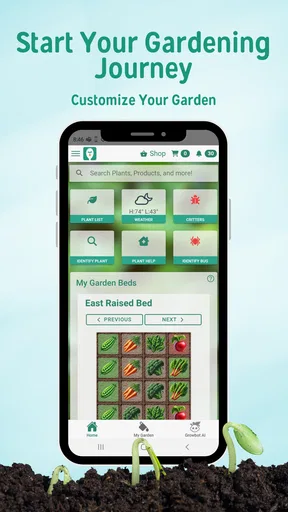
First things first, downloading and setting up Seed to Spoon was a breeze. The app is available for both Android and iOS, so no matter your device, you can get started in no time. When I opened the app, I was immediately greeted by a clean and intuitive interface. It felt like a breath of fresh air compared to some other gardening apps I've tried, which can sometimes feel a bit cluttered with information.
The app asks you a few simple questions about your garden space, location, and what you're interested in growing. This initial setup tailors the experience to your specific needs, which is a nice touch. It's like having a personal gardening assistant right in your pocket!
Features That Stand Out
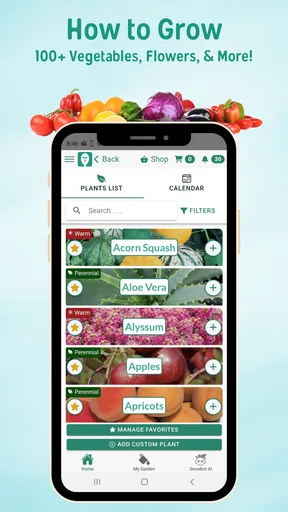
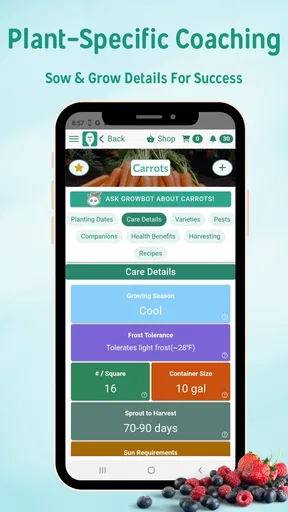
Now, let's talk about the features that really make this app shine. One of the standout features is its plant database. With over 100 different plant varieties, you get detailed information on how to grow each one, including when to plant, how much water is needed, and what kind of sunlight they prefer. This database is not just a list; it includes rich details that can help even the most novice gardener feel like a pro.
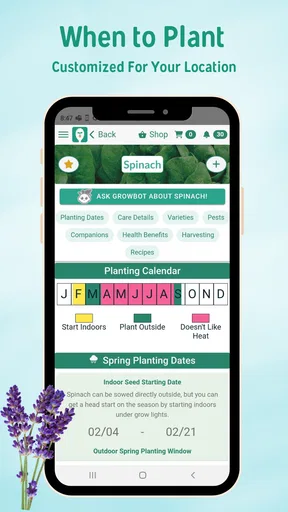
Another feature I found incredibly useful is the customized planting calendar. Based on your location, the app generates a calendar that tells you the best times to plant and harvest different crops. It's like having a mini weather station specifically for your garden. This is especially helpful for someone like me who loves the idea of gardening but tends to forget when to actually do the work!
My practical tip is to treat that calendar as a planning guide, then compare it with what is happening in your own yard. A sheltered bed, a shaded balcony, and an exposed plot can behave differently even in the same area. I would use the dates to prompt a check of the soil and conditions, not as an instruction to plant regardless of the weather. That distinction matters most when a season turns unusually warm or cold.
The planting calendar also works better when you think in stages instead of trying to schedule the whole garden at once. I would start with a few crops I genuinely want to eat, check their timing, and then add more only after the first plan feels manageable. That approach reduces the chance of turning an enthusiastic weekend into a long list of sowing jobs that compete with ordinary household routines.
User Experience and Interface
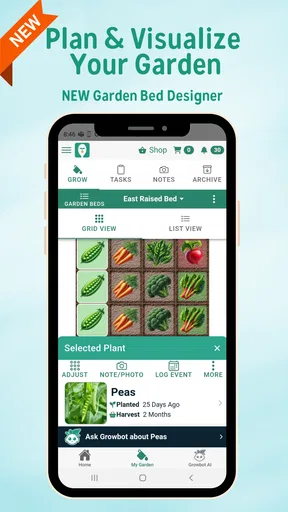
As I navigated through the app, I appreciated its user-friendly design. The developers clearly put a lot of thought into making the app accessible to all levels of gardeners. The drag-and-drop garden planner feature is both fun and functional. You can easily map out your garden space, experiment with different layouts, and see how your plants will coexist. It's like playing a game of Tetris, but with plants!
That visual approach is particularly useful before buying seeds or rearranging a bed: I can try an arrangement on screen first and consider how much space I am assigning to each crop. It is still a plan, not a guarantee that every plant will thrive exactly as drawn. Actual spacing, growth, and access for watering can change the result, so I would leave room to adapt rather than filling every gap in the diagram.
For a small patio or a few containers, I would keep the plan deliberately simple. A detailed layout is most valuable when there are enough plants or beds that memory becomes unreliable. With only a handful of pots, the setup may feel like more work than the garden itself; with a larger mixed planting, seeing the arrangement can make decisions easier to revisit.
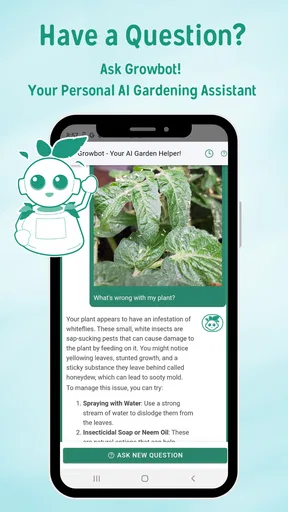
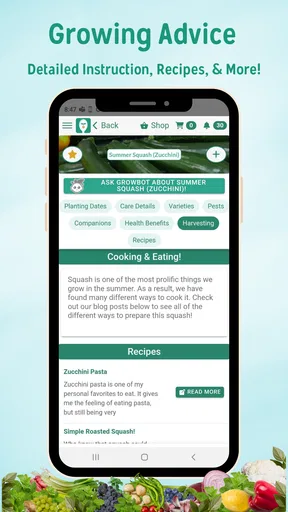
The app also offers valuable tips and tutorials for each step of the gardening process. From soil preparation to pest management, the app covers it all. And for those who like to learn visually, the video tutorials are a fantastic addition. It's like having a gardening class on demand.
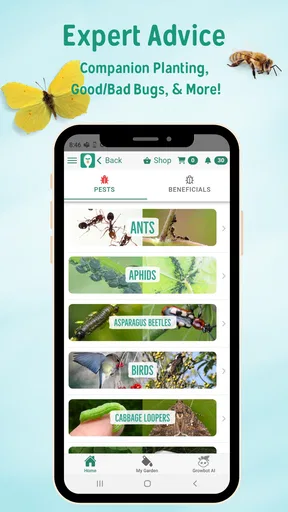
I would use those learning materials at the moment a question comes up, rather than trying to absorb everything before planting. If I am preparing a bed, guidance about that stage is more actionable than a broad reading session. For pests in particular, I would treat general advice as a starting point and inspect the actual plant carefully before deciding what to do; a symptom can have more than one cause, and a rushed treatment may create a new problem.
Community and Resources
One of the aspects that surprised me was the app's strong community focus. There's a built-in community hub where you can connect with other gardeners, share your progress, and even swap tips and tricks. It's a great way to feel connected and inspired, especially if you're gardening solo.
For me, the community is best used as a source of ideas and perspective, not as the final authority on a local gardening decision. A tip that worked in someone else’s climate, soil, or growing space may need adjustment at home. I would compare suggestions with the app’s plant guidance and my own observations instead of copying another person’s schedule exactly.
Additionally, Seed to Spoon provides access to a wealth of resources, including articles and blogs on various gardening topics. Whether you're interested in organic gardening or looking to start a small herb garden, there's something here for everyone.
As a household resource, those articles can give people a shared starting point when they disagree about what to do next. I would still keep the garden’s own plan as the practical reference: reading about a technique is useful, but it does not automatically record which bed was planted or whether a job has already been done. Separating inspiration from tracking keeps the app’s different uses clear.
Keeping expectations realistic
Garden planning apps sit between a paper notebook and a specialist reference. A notebook is flexible, private, and quick for rough sketches, but it depends on the writer remembering where information went. A general reminder app is convenient for chores, yet it is not built around plants or bed layouts. This app’s advantage is the combination of visual planning and growing guidance; its trade-off is that users who prefer a completely free-form system may find a dedicated structure unnecessary.
Before relying on it for a whole season, I would try one bed or a small group of containers. That gives you a chance to see whether the layout and guidance match the way you actually garden, without making a large project depend on a workflow you have not tested. If it suits you, expand the plan gradually. If you only need occasional plant facts, a simpler reference may be quicker.
The app is free to download, but the presence of in-app purchases means I would check what is included before building a routine around any paid option. You can start by using the core planning and guidance that fit your needs, then decide whether an extra purchase solves a real problem for your garden. I would not pay simply because more tools are available; the right choice depends on whether you will use them often enough to make your planning easier.
Version 80015 supports devices running Android 7.0 or later. That makes checking an older household phone or tablet worthwhile before assigning it as the shared garden device. Since several people may rely on the same plan, I would also decide who is responsible for keeping it current and avoid assuming that a shared device automatically means separate personal spaces or synchronized household accounts.
Final Thoughts
After spending some quality time with Seed to Spoon, I can confidently say it's a must-have for anyone interested in gardening. The app combines practicality with a user-friendly design that makes planning and managing a garden feel less like a chore and more like a rewarding hobby.
The meticulous attention to detail in the plant database, the personalized calendar, and the interactive community make it stand out in the crowded field of gardening apps. If you've ever found yourself staring at a packet of seeds, unsure of what to do next, this app is the guide you've been waiting for. So go ahead, download it, and watch your gardening dreams grow!
My more measured recommendation is to start with one real task: choose a crop, check its guidance, and make a small layout you can maintain. That will show whether the app’s combination of planning and learning fits your habits better than a paper note or a basic calendar. If it does, it can become a helpful household reference; if you prefer a bare-bones record, there is no need to force a more involved system into your routine.
Overall, I see it as a particularly appealing option for a beginner or a shared household garden where people benefit from seeing the same plan. It is less compelling for someone who already has a dependable method and only wants quick reminders. The key is to use its visual plan, growing advice, and community as supports for your own observation—not as a substitute for checking the plants in front of you.
Pros
- User-friendly interface for beginners.
- Customizable plant tracking features.
- Weather updates tailored to your location.
- Extensive library of gardening tips.
- Integrates well with smart gardening devices.
Cons
- Limited offline functionality.
- Some features require premium upgrade.
- Occasional bugs in plant database.
- Requires regular updates for accuracy.
- Not optimized for tablet use.
FAQs for Seed to Spoon - Garden Planner
What is Seed to Spoon - Garden Planner?
Seed to Spoon - Garden Planner is a comprehensive app designed to help users plan and manage their gardens efficiently. It provides tools for selecting plants based on your region, tracking growth, and offering gardening tips and resources. The app is perfect for both novice and experienced gardeners who wish to optimize their gardening efforts.
How does Seed to Spoon help with plant selection?
The app uses your location to suggest plants that are best suited for your climate and soil conditions. It includes a database of over 100 different plants, along with detailed information about each, such as growing seasons, care tips, and potential pest issues. This feature helps users make informed decisions about what to plant.
Is Seed to Spoon suitable for beginners?
Absolutely! Seed to Spoon is designed with beginners in mind, offering user-friendly features and step-by-step guides. The app includes educational resources such as videos and articles that cover basic gardening techniques and tips, making it easy for newcomers to start their gardening journey with confidence.
Does the app offer pest management solutions?
Yes, Seed to Spoon provides detailed information on common garden pests and how to manage them effectively. The app includes organic and traditional pest control methods, allowing users to choose the best solution for their needs. It also offers tips on prevention and how to maintain a healthy garden environment.
Can I track my garden’s progress with Seed to Spoon?
Yes, the app includes a garden tracking feature that allows users to monitor the growth and health of their plants. You can log planting dates, track watering schedules, and record notes on plant performance. This feature helps gardeners keep organized and make adjustments based on their garden’s specific needs.


